
Short answer: Every lead gets the Initial Outbound message. If they don't reply, the Try Again message is sent after a delay you choose. If they reply but then go quiet, the Re-Engage message is sent after a delay. Try Again and Re-Engage are each switched on separately, sent once per lead, and follow their own sending hours.
Customers also ask:
- How does the flow work: initial, try again and re-engage?
- If the initial and try again messages are ignored, is the re-engage message sent?
- Will the re-engage message go to high-intent leads? What if they go quiet a second time?
- How do I change when the follow-up messages are sent?
- Can we add more re-engage messages, or make them reference the conversation?
The sequence
- Initial Outbound: sent when the lead arrives, as long as it's within the campaign's Agent Operating Hours (on the main campaign page). Otherwise it's sent when those hours next open. Agent Operating Hours only apply to this first message.
- Try Again: sent once, if the lead hasn't replied to the Initial Outbound after the Try Again delay.
- Conversation: once the lead replies, the agent takes over and replies to every message, at any time of day.
- Re-Engage: sent once, if a lead who has replied stops responding for the Re-Engage delay. It's not sent to leads who've said they're not interested or have opted out.
Try Again and Re-Engage are separate paths. A lead who never replies gets the Try Again message, but not the Re-Engage message, because Re-Engage is only for leads who've already replied.
Leads sometimes reply days later, for example when they get a message during the week and deal with it at the weekend. When they do, the agent picks the conversation back up.
Try Again
- Who gets it: leads who haven't replied to the Initial Outbound.
- When: after the delay you set, within the Try Again sending hours.
- Default: off. You need to switch it on.
Re-Engage
- Who gets it: leads who replied and then went quiet, including highly engaged leads who haven't yet booked or enrolled.
- When: after the delay you set, within the Re-Engage sending hours. It's sent once per lead.
- Default: off. You need to switch it on separately from Try Again.
- One per campaign: each campaign has one Re-Engage message. You can't add more.
- A set message: like your other campaign messages, it can include fields such as the lead's name, but it doesn't refer back to what was said in the conversation. See Edit your campaign messages.
Delays and sending hours
- Each message has its own hours. Try Again and Re-Engage each have their own Sending Hours, set on their Manage page. The campaign's Agent Operating Hours don't apply to them. New campaigns start with 08:00 to 20:00, Monday to Friday, in the lead's time zone.
- Messages wait for sending hours. If a delay ends outside the message's sending hours, the message is held and sent when the hours next open.
- Choosing a delay: new campaigns start with a 6-hour delay. When you're starting out, 20 hours is generally the sweet spot. You can set the delay in hours or days to suit your leads.
Change the timing or switch a message on or off
- In the Enrola Customer App, go to Agent > Campaigns (open Campaigns) and open the campaign.
-
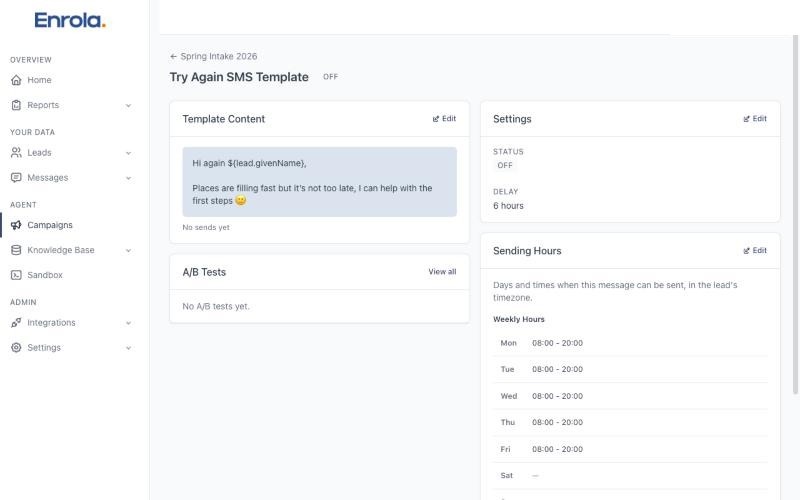
Click Manage next to Try Again or Re-Engage.
-
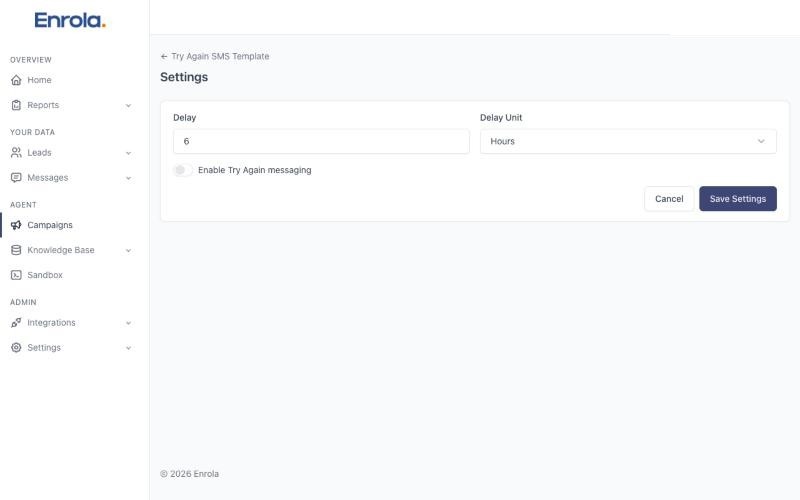
To change the delay or switch the message on or off, click Edit under Settings. Set the Delay and Delay Unit (for example 20 hours, or 1 day), use the toggle to enable or disable the message, and click Save Settings. Repeat for the other message: Try Again and Re-Engage are switched on separately.
-
To change when the message can be sent, click Edit under Sending Hours on the same page, set the hours for each day, and save.
Important: if you switch on Try Again or Re-Engage after a campaign has already contacted leads, the message is sent to every eligible lead in the campaign, no matter how old. If the campaign has older leads you don't want to contact, delete them before switching the message on. See Deleting leads, one at a time or in bulk.