
Short answer: Each campaign has its own sending hours, and they're always in the lead's local time. Agent Operating Hours control when the Initial Outbound is sent. Try Again and Re-Engage each have their own sending hours. Your agent replies to leads at any time, as long as the campaign is on.
Customers also ask:
- When does the agent send messages?
- Can we change the hours or send on weekends?
- Does the agent reply outside our sending hours?
- Which time zone are the hours in?
- Can we stop messages going out on public holidays?
What the hours control
Agent Operating Hours set the days and times the Initial Outbound (your campaign's first message) can be sent. If a lead arrives outside these hours, the first message is held until the hours open.
Try Again and Re-Engage each have their own sending hours, set on their own Manage pages. If a follow-up's delay ends outside its hours, it's held until they open. See How a campaign's message sequence works.
Agent replies aren't limited by hours. If a lead messages, your agent replies straight away, at any time, as long as the campaign is on.
Change your Agent Operating Hours
- Go to Agent > Campaigns (open Campaigns) and open the campaign.
- Under Agent Operating Hours, select Edit.
- Set the hours for each day. Leave a day blank for no Initial Outbound on that day. For all day, use 00:00 to 23:59.
- Add any Holidays (see below).
- Save your changes.
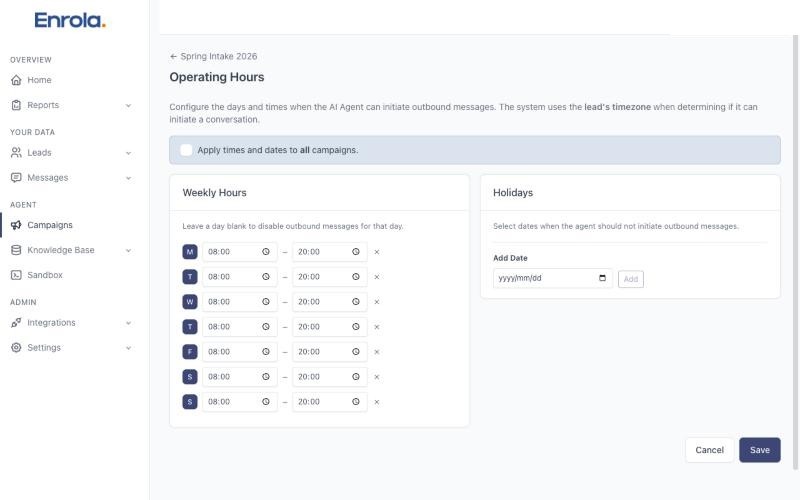
New campaigns start with 8am to 8pm, every day.
Apply times and dates to all campaigns: this option copies the hours and holidays to every campaign. It's handy if all your campaigns run the same hours, but take care: if this campaign runs 24/7, ticking it makes every campaign run 24/7.
To change the hours for Try Again or Re-Engage, open the campaign and select Manage next to the message. See Campaign settings explained.
Time zones
All sending hours are in the lead's local time, not yours.
- Australian leads: the time zone comes from the lead's state (
addressState). If the hours start at 9am, a lead in NSW and a lead in WA each get their message at 9am their time. If the state is missing, your organisation's default time zone is used, which you can see in Admin > Settings > General. - New Zealand, UK and Ireland leads: each country has one time zone.
- US leads: all US leads use US Central time (Chicago).
The country comes from addressCountry. See International leads and supported countries.
Holidays
Add a date as a holiday to pause the Initial Outbound for that whole day. Leads who arrive that day get their first message once the next open hours start.
Your agent still replies on holidays if a lead messages.
Running 24/7? On the day after a holiday, held messages start going out from midnight. Keep this in mind if you'd rather leads weren't texted overnight.
Good to know
- Sending hours only apply while the campaign is on. When a campaign is off, nothing is sent and the agent doesn't reply.
- Not sure what hours to use? See Should my agent run 24/7?